Brokers, Your Trade Notifications Now Come to WhatsApp
Brokers can now get a WhatsApp message the moment a trader starts a trade on one of their ads.


If you post ads on WireMe, you can now get a WhatsApp message the moment a trader starts a trade on one of them, with everything you need to accept, counter or decline.
Every broker knows how a trade gets lost. A trader finds your ad, sends a request, and waits. You're confirming an M-PESA payment, answering a customer on another platform, or just away from your screen. By the time you see the request, they've moved on to the next ad.
On a P2P order book, speed is part of your price. The broker who answers first usually gets the trade.
Until now, a new request on WireMe reached you in the app or by email. Neither is where a broker spends the day. WhatsApp is.
Here's what we added.
What's new
You can now get a WhatsApp message from WireMe whenever a trader starts a trade on one of your ads. It lands on the phone you already work from, next to the customer chats you already run.
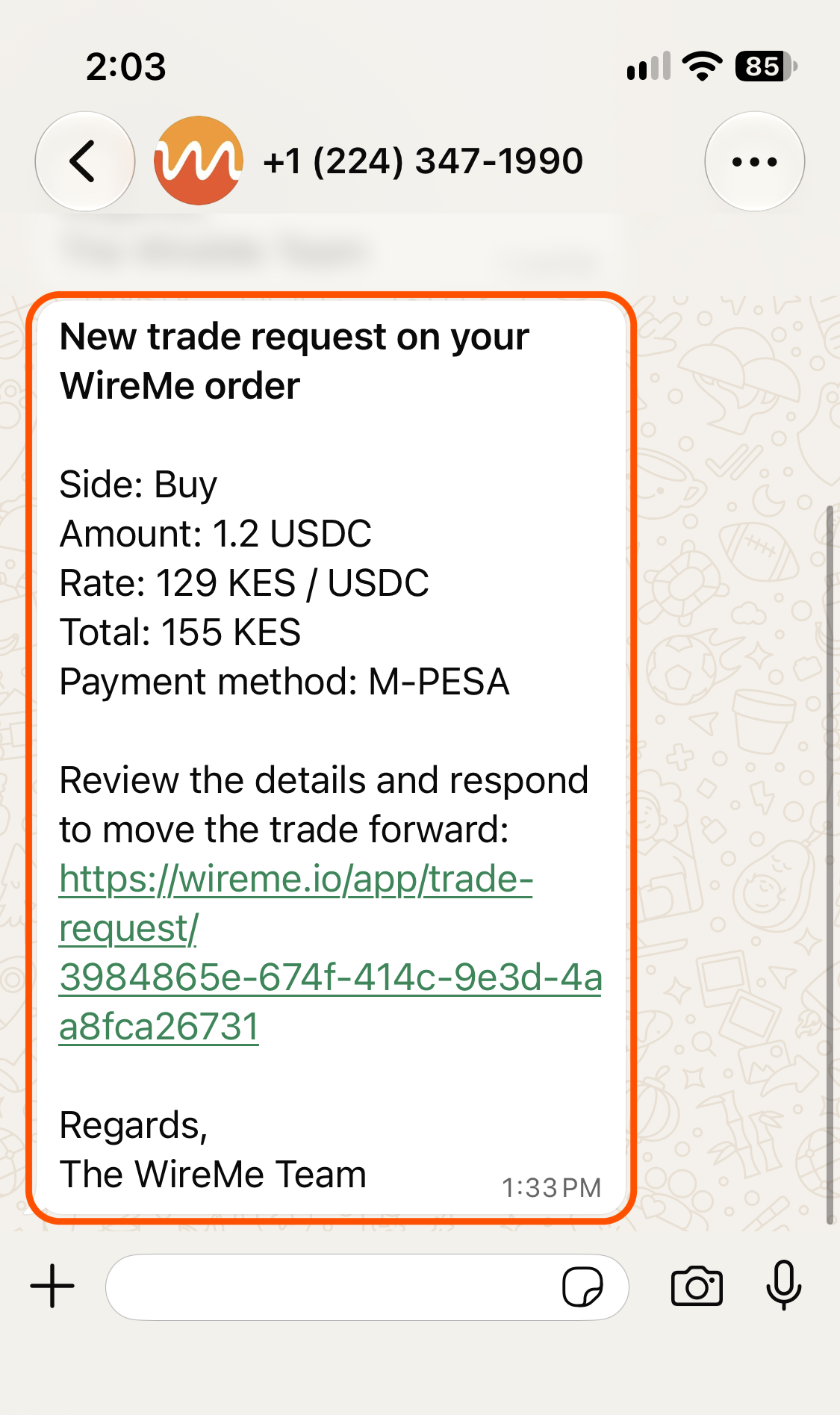
Each alert gives you what you need to decide whether to take the trade:
- Side. Whether the request is against your buy ad or your sell ad.
- Amount. How much USDC or USDT the trader wants to trade.
- Rate. The rate on the request, so you can check it against what you're quoting now.
- Total. The KES value of the trade, so you can check you can cover it before you accept.
- Payment method. How the shillings move, for example M-PESA.
- A link that opens the trade request in WireMe, where you accept, counter or decline it.
Turn it on
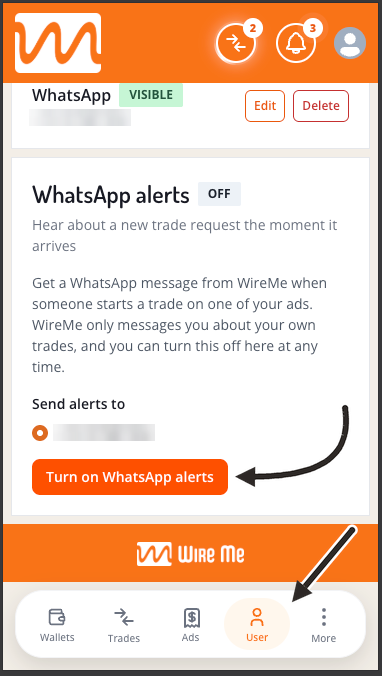
It takes under a minute.
- Open WireMe and go to User.
- Under Contact methods, make sure you have a WhatsApp number. If you don't, tap Add, choose WhatsApp, enter your number with its country code (for example +254712345678) and tap Save.
- In the WhatsApp alerts card, choose the number under Send alerts to.
- Tap Turn on WhatsApp alerts.
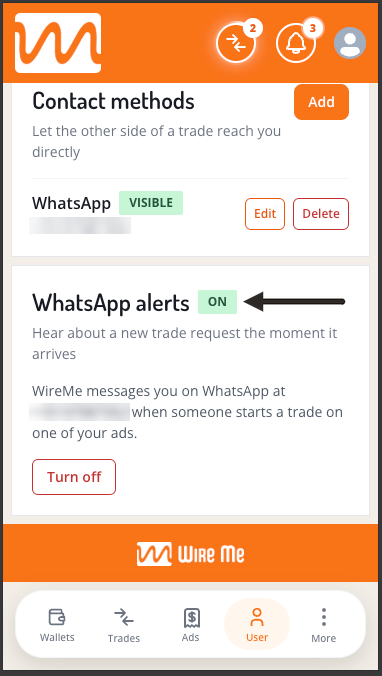
The card now shows On and the number your alerts go to.
Alerts come from WireMe's official WhatsApp notifications number, +1 (224) 347-1990, shown as WireMe. Save it to your contacts so you can tell it apart from customer messages at a glance.
Your business number stays yours
You choose where alerts go. Plenty of brokers keep one number for customers and another for themselves. Alerts can go to either. A number you keep hidden from traders can still get alerts, and it stays hidden from them.
You can change it or switch it off at any time. Tap Change number or Turn off in the same card.
We only message the number you agreed to. If you edit that number under Contact methods, alerts pause until you turn them on again for the new one. Delete it, and alerts stop.
It's about your trades, nothing else. WireMe only messages you about trade requests on your own ads.
We want to be precise about what this does and doesn't do. WhatsApp alerts cover one moment for now: a new trade request on one of your ads. When a trader counters, or a trade moves to escrow and payment, you'll still hear about it in the app and by email. And the alerts number only sends. If you need help, use Contact Us in the app, not a reply on WhatsApp.
Traders can see how fast you respond
Your response time shows on your public broker profile. A trader can see how quickly you usually answer before they ever send you a request. A broker who answers in minutes looks very different from one who answers in hours.
An alert on your phone is the simplest way to stay in the first group.
Try it now: open WireMe, go to User, and turn on WhatsApp alerts before your next trade request lands.